
Hey listen… AWS SQS (or Simple Queue Service) is a fully managed message queuing service designed to decouple and scale microservices, distributed systems, and serverless applications. Suppose you’re currently using some queue management software like RabbitMQ and exploring the benefits of AWS SQS. In that case, this post will help you understand how SQS works and how to migrate your application effectively.
Understanding AWS SQS
AWS SQS is a message queuing service that acts as a buffer between application components. It ensures that messages are reliably delivered, even when some components are unavailable or under heavy load.
Here are some SQS key concepts:
- Queues: Queues store messages until they are processed and deleted. Messages can be sent to a queue by one component and retrieved by another.
- Message Retention: If messages are not processed, SQS retains them in the queue for a configurable amount of time (from 1 minute to 14 days).
- Visibility Timeout: After retrieving a message, it remains invisible to other consumers for a specified period, allowing the consumer to process it.
- Dead-Letter Queues (DLQ): Used for handling messages that fail to be processed multiple times, ensuring problematic messages don’t block the system.
- Long Polling: Allows the consumer to wait for messages instead of continuously polling, reducing the cost and increasing efficiency.
There are two types of queues: standard and FIFO queues.
Standard queues deliver messages at least once and provide high throughput, but they may not guarantee the order of messages and may occasionally deliver messages more than once.
On the other hand, FIFO queues (First-In-First-Out) ensure messages are delivered exactly once and in the order they are sent and are used when the order of processing is critical, such as financial transactions.
Is worth mentioning that SQS is serverless, reliable, auto-scalable and cost-effective.
Want to know more about SQS? Check the official docs here.
Use Case: Order Processing System
Imagine an e-commerce platform where customers place orders. The order details must be processed by multiple backend services, such as payment validation, inventory management, and shipping. AWS SQS can decouple these services by ensuring all orders are added to a queue and consumed independently by the respective services. This provides scalability and fault tolerance.
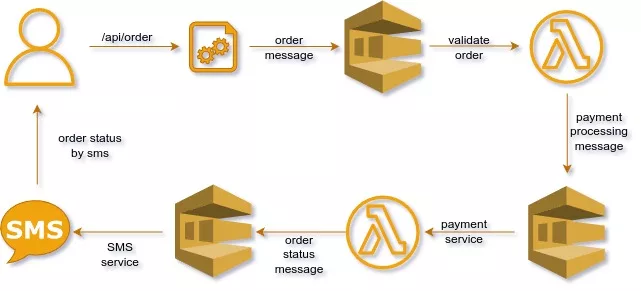
As shown in this draw, each order processing step is separated by a queue to decouple services.
Example with C# Code
Below are some C# code snippets that demonstrate how to interact with SQS using the official AWS SDK for .NET.
Setting Up AWS SDK for .NET
Before proceeding, ensure you have configured your AWS credentials via the AWS CLI or an IAM user with SQS permissions.
Run this command to install AWS SDK for .NET in your project:
dotnet add package AWSSDK.SQSCreate and Delete Queues
using Amazon;
using Amazon.SQS;
using Amazon.SQS.Model;
using System;
using System.Threading.Tasks;

class SQSManager
{
    private static readonly string _region = "us-east-1"; // Change to your region

    public static async Task<string> CreateQueueAsync(string queueName)
    {
        var client = new  AmazonSQSClient(RegionEndpoint.GetBySystemName(_region));
        var request = new CreateQueueRequest { QueueName = queueName };
        var response = await client.CreateQueueAsync(request);
        Console.WriteLine($"Queue created: {response.QueueUrl}");
        return response.QueueUrl;
    }

    public static async Task DeleteQueueAsync(string queueUrl)
    {
        var client = new  AmazonSQSClient(RegionEndpoint.GetBySystemName(_region));
        await client.DeleteQueueAsync(queueUrl);
        Console.WriteLine("Queue deleted.");
    }

    public static async Task SendMessageAsync(string queueUrl, string message)
    {
        var client = new AmazonSQSClient(RegionEndpoint.GetBySystemName(_region));
        var request = new SendMessageRequest
        {
            QueueUrl = queueUrl,
            MessageBody = message
        };
        await client.SendMessageAsync(request);
        Console.WriteLine($"Message sent: {message}");
    }

}
Simple Apllications
Publisher
This application sends messages to a queue.
using System;
using System.Threading.Tasks;

class PublisherApp
{
    static async Task Main(string[] args)
    {
        string queueName = "OrderQueue";
        string message = "Order123: Process payment and ship item.";

        string queueUrl = await SQSManager.CreateQueueAsync(queueName);
        await SQSManager.SendMessageAsync(queueUrl, message);

        Console.WriteLine("Message published.");
    }
}
Consumer
This application reads and deletes messages from the queue.
using System;
using System.Threading.Tasks;

class PublisherApp
{
    static async Task Main(string[] args)
    {
        string queueName = "OrderQueue";
        string message = "Order123: Process payment and ship item.";

        string queueUrl = await SQSManager.CreateQueueAsync(queueName);
        await SQSManager.SendMessageAsync(queueUrl, message);

        Console.WriteLine("Message published.");
    }
}
Conclusion
AWS SQS offers scalability, fault tolerance, and ease of management. By following this post, you can set up queues, publish messages, and consume them with applications written in C#. Start leveraging AWS SQS to enhance your application’s ecosystem!
See ya!